











This JSON reader mobile application developed based on Kotlin has attracted many technology enthusiasts with its open source sharing features. The software interface design is extremely simple.用户可以通过自主添加图书源,打造个性化的阅读平台。 It has become an essential tool for readers who are keen on customizing the experience.如果您喜欢,不妨从本站下载。
应用功能
1、图书馆资源极其丰富,汇集了大量原创优质内容,满足各类阅读需求;
2. The content updates quickly, ensuring that new works by famous artists on the network platform can be presented as soon as possible;
3. Built-in interactive communication function, supports tips and comments, and facilitates direct communication between readers and creators;
The latest version of
应用说明
JSON Reader Mobile is a newly developed open source reading software using Kotlin language.我们诚挚邀请用户参与体验。
应用特色
1. Supports immersive status bar effect, and the status bar can achieve color transparency;
2. The color of the navigation bar can be dynamically adjusted, and the shadow effect can be switched according to night mode;
3. The current shadow size parameter is set to 6 theme lists;
4. Provide theme saving, importing and sharing functions;
5. Daytime mode has an independent main color configuration;
6. In day mode, the accent color and background color can be set independently;
7. The color of the bottom operation bar supports custom adjustment;
8. The theme configuration of the bottom bar color in day mode can be saved separately;
9. The saved daytime theme configuration can be recalled later or shared with other users;
常见问题
1. Why does the interface not display any content after the initial installation;
由于该应用主要提供内容转码功能,不包含图书库,因此首次使用时需要手动导入图书源文件。 Users can obtain book source data shared by other readers through relevant public accounts, QQ groups or community comments;
2. How to import book source files stored locally on the device;
First download the book source file, the format is usually txt or txt. Some files may need to be modified to have a suffix of txt before they can be successfully imported;
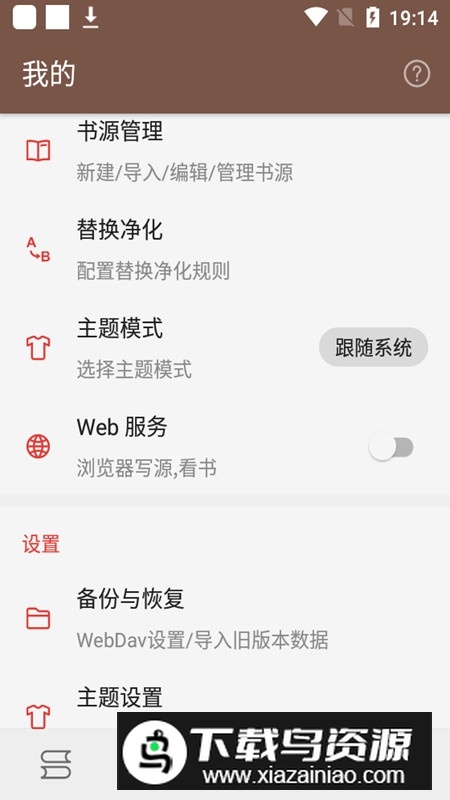
Open the reading application and enter the personal center, select the book source management option;
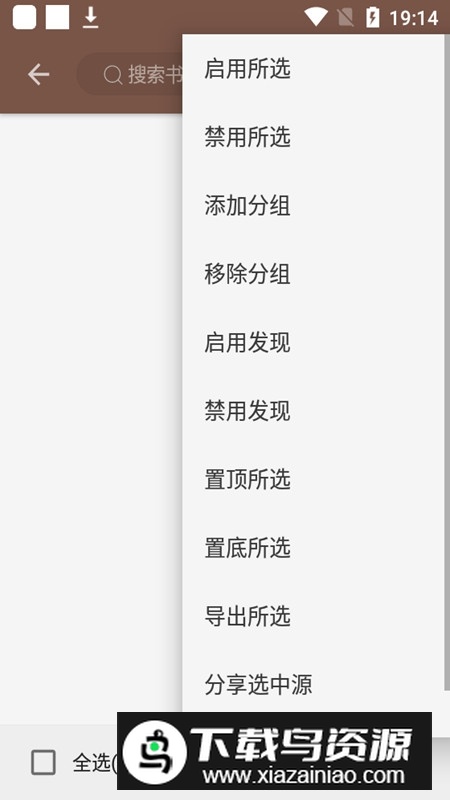
Click the menu in the upper right corner and select the local import function;
Locate the storage path where the book source file is located in the file selector;
Select the file to complete the import operation, and then return to the book source management interface;
The file download path for the new version of QQ application is usually: Android/data/com.tencent.mobileqq/Tencent/QQfile_recv/;
更新内容
v3.22.121521Update the cronet component to version 108.0.5359.128;
Text reading has added a switch option to remove duplicate titles. This function is enabled by default for a single chapter and can handle a few special cases;
Some performance optimizations contributed by Horis;
v3.22.100521Optimize the query response speed of the bookshelf database;
When the WebDav cloud book version is newer, the refresh operation of the details page can update the local book. This was not possible in the previous version because the remote address was not recorded;
If the local book file is deleted and the WebDav address has been recorded, the system will automatically re-download it from the cloud;
Some function optimizations contributed by Xwite and 821938089;
A new ungrouped filtering function has been added to the book source management interface;
Fixed several problems in the use of self-built WebDav service;
Fixed an abnormal operation where long pressing of the source change button only takes effect once;
Fix the technical problem that java.post and other methods cannot save cookies;
Update the cronet component to version 103.0.5060.129;
Solve the problem of unresponsiveness of some web buttons on the login interface;
Reading records support sorting by last reading time;
A new search function has been added to the reading history interface;
修复其他已知系统问题;





-
做超声检查时,医生为什么要在患者肚子上涂粘粘的东西 2026-02-03
-
绯红之境兑换码最新2021 礼包兑换码大全 2026-02-03
-
三国群英传7霸王再临攻略 霸王再临攻略技巧开启方法 2026-02-03
-
小米mix fold有前置摄像头吗 2026-02-03
-
妄想山海怎么加好友 加好友方法大全 2026-02-03
-
天地劫幽城再临归真4-5攻略:第四章归真4-5八回合图文通关教学 2026-02-03